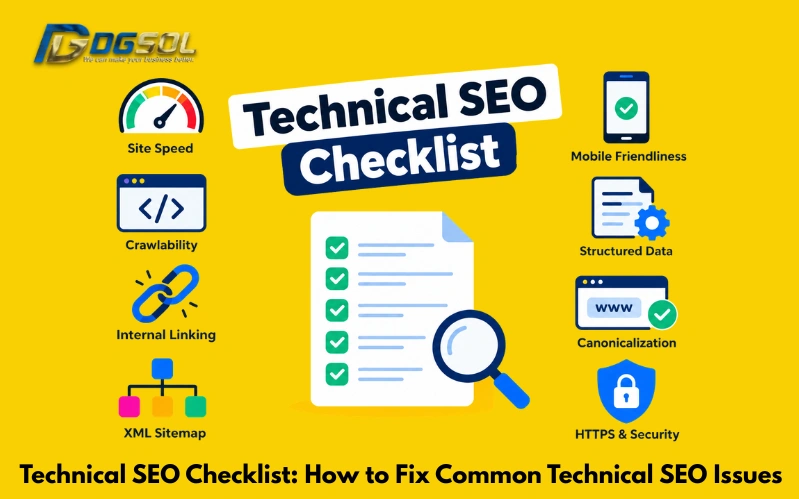
Technical SEO is the foundation that helps search engines crawl, understand, index, and access your website properly. Even if a website has useful content and strong backlinks, technical problems can make it harder for search engines to discover and process important pages. A regular technical SEO audit can help identify these problems before they affect organic search performance. This checklist explains the most common technical SEO problems, how to find them, and practical ways to fix them. For businesses targeting customers, a technical SEO checklist can also help ensure that websites perform well for users across mobile devices, different connection types, and Malaysia-focused search queries.
What Is Technical SEO?
Technical SEO refers to the process of improving the technical parts of a website so that search engines can crawl, render, understand, and index its pages effectively. Unlike content optimization, it focuses more on the website’s infrastructure and accessibility. Technical SEO does not guarantee higher rankings on its own. However, resolving technical barriers can help search engines access and process your important pages more efficiently. For this reason, it should be treated as an ongoing process rather than a one-time task.
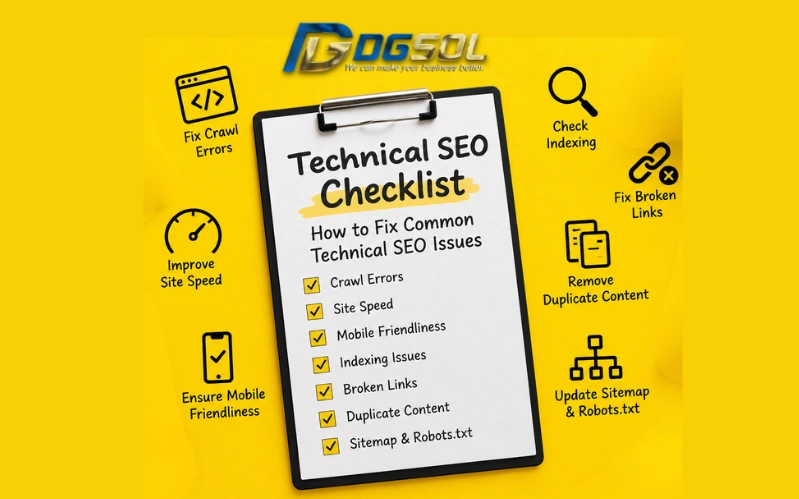
Technical SEO Checklist for Your Website
Use the following checklist as a starting point for a website technical SEO audit, which is given as”
1. Check Website Crawlability
Crawlability SEO refers to how easily search engine crawlers can access the pages and resources on your website. Google uses automated crawlers, including Googlebot, to discover and process web pages. If important pages cannot be accessed due to technical restrictions, they may have difficulty appearing in search results.
Check for:
- Blocked pages
- Server errors
- Broken internal links
- Incorrect robots.txt rules
- Redirect problems
- Orphan pages
- Crawl errors
- Incorrect status codes
How to fix it:
First, identify which URLs cannot be crawled and determine why. Possible fixes include:
- Repairing broken internal links
- Removing accidental robots.txt restrictions
- Fixing server errors
- Correcting redirect problems
- Improving internal linking to important pages
- Making sure important resources can be accessed by search engines
2. Check Google Indexing Issues
Crawling and indexing are not the same thing. A search engine may successfully crawl a page but decide not to index it. Indexability SEO therefore requires checking whether important pages are actually eligible for inclusion in search results.
Common website indexing issues include:
- Pages accidentally marked with noindex
- Canonical tags pointing elsewhere
- Pages returning errors
- Duplicate URLs
- Poorly accessible pages
- Incorrect robots directives
- Pages with technical rendering problems
How to Fix Indexing Issues
If an important page is unintentionally excluded, correct the technical issue and request reindexing when appropriate. Start by checking the affected URL in Google Search Console.
- Whether Google can access the page
- Whether the page returns a successful HTTP status
- Whether a noindex directive exists
- Which canonical URL Google selected
- Whether robots.txt blocks crawling
- Whether the page contains useful, unique content
3. Review Your XML Sitemap
An XML sitemap provides search engines with information about URLs that you consider important for discovery. A sitemap does not force Google to index every URL included in it, but a clean sitemap can support website discovery and technical SEO monitoring.
Check your sitemap for:
- Broken URLs
- Redirected URLs
- Non-canonical URLs
- noindex pages
- Duplicate URLs
- Incorrect URL versions
- Outdated pages
- Invalid XML formatting
XML Sitemap SEO Best Practices
Your sitemap should generally focus on important, indexable, canonical tags. Avoid filling it with URLs that:
- Return errors
- Redirect elsewhere
- Are blocked from indexing
- Are duplicate versions
- Are not intended to appear in search results
4. Check Robots.txt
The robots.txt file provides crawling instructions to search engine bots. A common technical SEO mistake is accidentally blocking important sections of a website. For example, an incorrectly configured robots.txt file could prevent Googlebot from crawling pages or resources that should remain accessible.
Check for:
- Incorrect Disallow rules
- Important directories being blocked
- Incorrect wildcard rules
- Conflicting crawling instructions
- Sitemap references
How to Fix Robots.txt Errors
Review the file carefully before making any changes. If an important page or resource is accidentally blocked, update the relevant rule and test the configuration. Do not use robots.txt as a substitute for all indexing controls. Crawling restrictions and indexing directives serve different purposes.
5. Fix Canonical Tag Issues
Canonicalization helps search engines understand which URL should be treated as the preferred version when multiple URLs contain similar or duplicate content. A canonical URL is specified using a canonical link element.
For example:
https://example.com/page/ could be designated as the preferred URL when several URL variations point to similar content.
Common canonical tag errors include:
- Missing canonical tags where one is needed
- Canonical pointing to an unrelated page
- Canonical pointing to a redirect
- Canonical pointing to a 404 page
- Multiple conflicting canonical tags
- Incorrect HTTP/HTTPS canonical versions
- Incorrect www/non-www versions
Canonical URL Best Practices
When reviewing canonical SEO:
- Use the preferred URL consistently
- Use the correct HTTPS version
- Avoid canonicalizing unrelated pages
- Avoid canonical URLs that return errors
- Keep canonical URLs consistent with internal links
- Review canonical tags after website migrations
- Check canonical URLs during technical audits
6. Find and Fix Duplicate Content
Duplicate content SEO problems can occur when substantially similar content is accessible through multiple URLs. Common causes include:
- URL parameters
- HTTP and HTTPS versions
- www and non-www versions
- Trailing-slash variations
- Duplicate category URLs
- Print versions
- Sorting and filtering URLs
- CMS-generated duplicate pages
How to Fix Duplicate Content
Do not automatically redirect or canonicalize every similar page. First determine which URL should genuinely be considered the preferred version. Possible technical solutions include:
- Canonical tags
- 301 redirects
- Consistent internal linking
- Removing unnecessary URL versions
- Improving URL architecture
- Controlling parameter-based URLs
Check Website Speed and Core Web Vitals
Check website speed performance which effect site working as it is important part of technical SEO and user experience. Google’s Core Web Vitals focus on specific aspects of loading performance, responsiveness, and visual stability.
The three current Core Web Vitals are:
- LCP — Largest Contentful Paint
- INP — Interaction to Next Paint
- CLS — Cumulative Layout Shift
Check Largest Contentful Paint (LCP)
Largest Contentful Paint measures how quickly the main content of a page becomes visible. A slow LCP can be caused by:
- Large images
- Slow server response
- Render-blocking resources
- Poor caching
- Heavy JavaScript
- Slow page construction
Improve Interaction to Next Paint (INP)
Interaction to Next Paint measures how responsive a page is when users interact with it. Poor INP can result from excessive JavaScript or tasks that keep the browser busy. Possible improvements include:
- Reducing unnecessary JavaScript
- Removing unused scripts
- Breaking up long browser tasks
- Optimizing interactive components
- Reducing third-party scripts where possible
Fix Cumulative Layout Shift (CLS)
Cumulative Layout Shift measures unexpected movement of page elements during loading. Common causes include:
- Images without reserved dimensions
- Dynamically inserted content
- Ads changing layout
- Web fonts causing visual changes
- Elements loading at different times
Check Mobile SEO and Usability
A modern technical SEO allow search engines to use mobile-first indexing for websites.A mobile-friendly website should provide substantially the same important content and functionality on mobile devices as on desktop.
Common Mobile SEO Problems
Check for:
- Poor responsive design
- Small text
- Difficult-to-use navigation
- Tiny clickable elements
- Horizontal scrolling
- Slow mobile pages
- Important content missing from mobile
- Images that do not scale correctly
- Intrusive elements covering content
Mobile-First SEO Best Practices
For websites targeting Malaysia, mobile SEO should be considered as part of the overall technical SEO process rather than as a separate activity. For effective mobile optimization:
- Use responsive web design
- Keep important content available on mobile
- Optimize images
- Improve mobile page speed
- Make navigation easy to use
- Ensure buttons and links are easy to tap
- Test pages across different screen sizes
Fix Redirect and HTTPS Issues
Redirects are useful when URLs change, but incorrect implementation can create technical SEO problems.
Review 301 and 302 Redirects
Check whether redirects accurately represent the intended URL relationship.
- A 301 redirect is generally used when a page has permanently moved.
- A 302 redirect generally indicates a temporary change.
Fix Redirect Chains and Loops
A redirect chain occurs when one URL redirects through multiple intermediate URLs before reaching the final destination.
For example:
URL A → URL B → URL C → URL D
Whenever possible, simplify the path so the old URL points directly to the final destination.
A redirect loop is more serious because URLs repeatedly redirect between locations without reaching a final page.
For example:
URL A → URL B → URL A
Check for:
- Redirect chains
- Redirect loops
- Broken redirects
- Incorrect redirect destinations
- HTTP-to-HTTPS redirect problems
Check HTTPS and Mixed Content
HTTPS protects communication between the user’s browser and the website. For HTTPS technical SEO, make sure important versions of the website consistently use it.
Check for:
- HTTP pages that should redirect to HTTPS
- HTTP resources on HTTPS pages
- Incorrect canonical URLs
- Mixed content
- Incorrect internal links
- Certificate problems
Mixed content SEO issues can occur when an HTTPS page attempts to load certain resources through insecure HTTP connections.
Check Structured Data and Schema Markup
Schema markup SEO can help search engines understand eligible content types and, where supported and correctly implemented, may make pages eligible for certain enhanced search features.
Common Schema Markup Errors
Technical schema problems can include:
- Invalid JSON-LD
- Missing required properties
- Incorrect property values
- Unsupported markup
- Schema that does not match visible page content
- Duplicate structured data
- Incorrect implementation
Structured Data Implementation
Structured data should not be added simply to insert more keywords into a page. Accuracy and relevance are more important. Before adding schema, identify the content type that genuinely matches the page. Then:
- Implement the appropriate structured data.
- Ensure the markup reflects visible content.
- Validate the implementation.
- Correct errors.
- Monitor eligible search features.
How to Perform a Technical SEO Audit
A technical SEO audit is a systematic review of a website’s technical health. A useful audit combines search engine data, a website crawl, and manual checks.
Start With Google Search Console
Google Search Console can provide valuable information about:
- Page indexing
- Sitemap status
- Crawl-related problems
- Core Web Vitals
- Search performance
- Security issues
- Manual actions
Start by reviewing the reports that are most relevant to the website’s current problems.
Crawl the Website
A technical website audit should include a crawl of important URLs. Look for:
- 4xx errors
- 5xx errors
- Redirect chains
- Redirect loops
- Duplicate URLs
- Canonical inconsistencies
- Non-indexable pages
- Broken internal links
- Missing or incorrect technical elements
For larger websites, web crawling tools can help process thousands of URLs more efficiently.
Common Technical SEO Issues to Fix
| Technical SEO Issue | What to Check | Possible Fix |
| Pages not indexed | Search Console | Review indexing and page accessibility |
| Crawl errors | Server and URL status | Fix broken or inaccessible URLs |
| Robots.txt blocking | Robots.txt | Remove incorrect restrictions |
| Sitemap errors | XML sitemap | Correct or regenerate sitemap |
| Duplicate URLs | URL versions | Use canonicalization or redirects |
| Wrong canonical | Canonical tags | Set the correct preferred URL |
| Redirect chains | Redirect path | Simplify the redirect route |
| Redirect loops | Redirect configuration | Correct conflicting rules |
| Slow LCP | Images and resources | Optimize loading performance |
| High INP | JavaScript | Reduce heavy browser tasks |
| CLS problems | Dynamic elements | Reserve layout space |
| Mixed content | HTTP resources | Serve resources through HTTPS |
| Invalid schema | Structured data | Correct and validate markup |
| Mobile usability | Mobile pages | Improve responsive implementation |
Technical SEO Best Practices
Following technical SEO best practices can make ongoing website maintenance easier.
- Keep Important Pages Crawlable
Make sure important search pages can be discovered and accessed by search engine crawlers.
- Maintain a Clean Sitemap
Keep your XML sitemap focused on relevant, canonical, indexable URLs.
- Use Canonical URLs Correctly
Canonical tags should clearly communicate the preferred URL when appropriate.
- Minimize Unnecessary Redirects
Avoid creating long redirect chains when a direct redirect is possible.
- Monitor Core Web Vitals
Regularly check LCP, INP, and CLS, especially after significant website changes.
- Prioritize Mobile Usability
Test important pages on mobile devices and ensure content and functionality remain accessible.
- Keep HTTPS Consistent
Avoid unnecessary HTTP versions and resolve mixed-content problems.
- Validate Structured Data
Check structured data after implementation and whenever page templates change.
- Monitor Google Search Console
Regular Search Console reviews can help identify new indexing, crawling, performance, and security problems.
- Perform Regular Technical Audits
Technical problems can appear after CMS updates, redesigns, migrations, plugin changes, or URL restructuring. Regular audits help identify these issues earlier.
Final Thoughts
Technical SEO provides the technical foundation that allows search engines to discover, crawl, understand, and index your website. A strong technical SEO checklist should cover more than broken links. It should include crawlability, indexing, XML sitemaps, robots.txt, canonical URLs, duplicate content, Core Web Vitals, mobile SEO, redirects, HTTPS, and structured data. Regular SEO audits can help identify problems before they become larger website issues. For businesses, it ensures that important pages are accessible, mobile-friendly, technically sound, and ready to be processed by search engines. The best approach is to fix the most important technical barriers first, then continue monitoring website performance and search accessibility as the site changes.
Frequently Asked Questions
What Are the Most Common Technical SEO Issues?
Common technical SEO issues include crawl errors, indexing problems, incorrect canonical tags, duplicate URLs, sitemap errors, robots.txt problems, slow pages, Core Web Vitals issues, mobile usability problems, redirect errors, HTTPS issues, and invalid structured data.
How Do You Fix Technical SEO Issues?
First, identify the problem using tools such as Google Search Console and website crawlers. Then determine the cause, prioritize the issue based on its potential impact, implement the appropriate fix, and monitor the result.
How Often Should You Perform a Technical SEO Audit?
The frequency depends on the website. Regular monitoring is useful for most sites, while detailed audits are especially important after migrations, redesigns, CMS changes, URL restructuring, or significant technical updates.
What Is the Difference Between a Sitemap and Robots.txt?
An XML sitemap helps search engines discover important URLs, while robots.txt provides crawling instructions. A sitemap does not replace robots.txt, and robots.txt should not be treated as a general replacement for indexing controls.
How Do Core Web Vitals Affect Technical SEO?
Core Web Vitals measure aspects of loading performance, responsiveness, and visual stability. Improving them can contribute to a better page experience, although Core Web Vitals alone do not guarantee higher search rankings.
When Should a Business Consider Technical SEO Services Malaysia?
Businesses may consider technical SEO services Malaysia when they have large or technically complex websites, persistent indexing problems, migration issues, significant crawl errors, performance problems, or technical issues that require specialist and developer support.