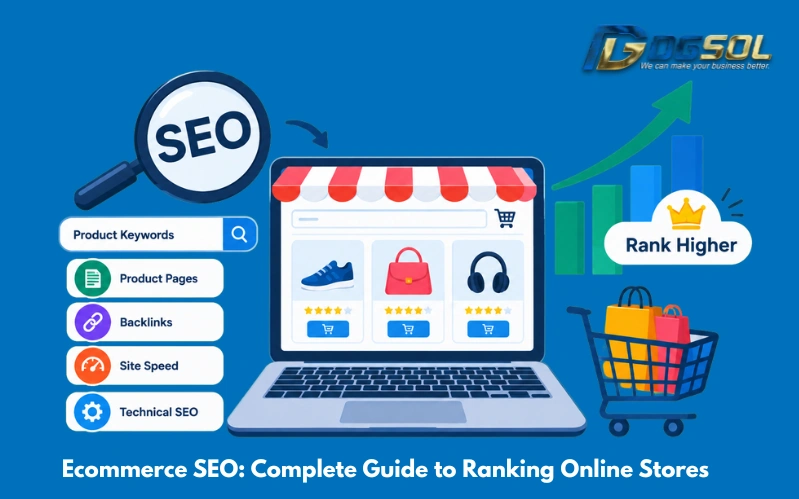
Ecommerce SEO is the process of optimizing an online store to improve its visibility in relevant search engine results. It helps search engines discover important pages, understand product information, and connect shoppers with products that match their searches. Successful ecommerce SEO involves more than adding keywords to product descriptions. Your store needs useful product pages, well-organized categories, relevant internal links, accessible URLs, and a technical structure that allows search engines to discover and process important content. Whether you use Shopify, WooCommerce, Magento, or a custom ecommerce platform, this guide explains how to conduct keyword research, optimize product and category pages, improve technical SEO, use structured data, and measure organic search performance.
What Is Ecommerce SEO?
Ecommerce SEO, also known as ecommerce search engine optimization, involves improving an online store so its pages can be discovered and potentially rank for relevant search queries. Different pages serve different search purposes. For example, an electronics store might optimize a category page for “wireless headphones” and an individual product page for a specific headphone model. A buying guide could target a question such as “how to choose wireless headphones.” Understanding these differences helps you create the right page for each search intent instead of making multiple pages compete for the same keywords.
Why Is Ecommerce SEO Important for Online Stores?
A well-planned ecommerce SEO strategy can help businesses attract relevant organic traffic, improve product discovery, and support the customer buying journey.
- Increase organic visibility: Optimized product and category pages can appear for searches related to your products.
- Reach relevant shoppers: Targeting informational, commercial, and transactional searches helps connect different types of customers with appropriate pages.
- Support long-term traffic growth: Useful pages can continue attracting visitors while they remain relevant and competitive.
- Improve shopping navigation: Clear categories, useful product details, and relevant internal links make products easier to find.
- Complement paid advertising: Organic search can support paid campaigns as part of a wider marketing strategy.
SEO does not guarantee rankings or sales. Results depend on competition, website quality, search demand, and how well your pages meet users’ needs.
How to Do Ecommerce SEO for Online Store?
To improve SEO for ecommerce websites, follow a structured process:
- Audit your store: Identify technical issues, indexing problems, weak landing pages, and opportunities to improve organic performance.
- Research keywords: Find the searches customers use when researching, comparing, and buying products.
- Map keywords to pages: Match broad product terms to suitable category pages and specific product searches to individual product pages.
- Optimize important pages: Improve product descriptions, category content, metadata, images, and internal links.
- Fix technical problems: Review crawlability, duplicate URLs, filters, canonical tags, mobile performance, and indexing.
- Monitor results: Track search visibility, organic traffic, conversions, and revenue to guide further improvements.
Ecommerce Keyword Research: Find the Right Keywords
Ecommerce keyword research helps you understand what shoppers search for and which pages should target those searches. Focus on relevance and search intent rather than choosing keywords based on search volume alone.
Understand Search Intent
Ecommerce searches generally fall into several categories:
- Informational: The shopper wants to learn about a product or problem, such as “how to choose a standing desk.”
- Commercial investigation: The shopper is comparing options, such as “best office chairs for back support.”
- Transactional: The shopper is closer to purchasing, such as “buy ergonomic office chair online.”
- Branded or product-specific: The shopper is looking for a particular brand, model, or specification.
Find Product and Category Keywords
Identify broad terms for categories and more specific terms for individual products. Useful modifiers may include brand, model, size, color, material, features, compatibility, and intended use.
For example:
| Page type | Example keyword |
| Category page | Running shoes |
| Subcategory page | Women’s running shoes |
| Product page | Brand X lightweight running shoes Model Y |
| Buying guide | How to choose running shoes |
Research Long-Tail and Competitor Keywords
Long-tail keywords describe more specific needs and can help you reach shoppers looking for particular product attributes.
Review competing stores’ category pages, product listings, titles, and content to identify relevant topics they cover and opportunities your website has missed. Do not copy competitors’ content; use the research to understand search intent and improve your own pages.
Ecommerce Category Page SEO: Optimize Category Pages
Category pages group related products and help shoppers navigate your catalog. They can target broader product searches and are an important part of online store SEO.
-
Choose Relevant Category Keywords
Select terms that accurately describe the products in each category. Create separate categories when the products and customer needs justify them, not just to target every possible keyword variation. For example, a store with a suitable product range might have separate categories for wireless headphones, gaming headsets, and noise-cancelling headphones.
-
Optimize Category Titles and H1 Headings
Write descriptive titles and headings that make the category clear.
Example meta title: Women’s Running Shoes | Lightweight Running Footwear
Example H1: Women’s Running Shoes
Keep the title relevant to the page and avoid keyword stuffing or unrelated promotional wording.
-
Add Helpful Category Content
A short introduction can explain the products available and help shoppers choose suitable options. A running-shoes category, for example, could explain differences in cushioning, fit, or intended running surface when those distinctions are relevant to the products.
Keep the copy useful and easy to scan. Avoid adding long blocks of text that push product listings too far down the page without helping customers.
-
Write Unique Meta Descriptions
Create a concise, relevant description for each important category.
Example meta description: Explore women’s running shoes in different styles and designs. Compare features to find footwear suited to your running needs.
Google may generate a different search snippet depending on the query, so treat meta descriptions as useful summaries rather than guaranteed search-result text.
-
Improve Product Discovery and Internal Links
Use descriptive product names and crawlable links to individual product pages. Connect categories with relevant subcategories and buying guides where helpful. Breadcrumbs can also help shoppers understand where they are within the store.
Google’s ecommerce site structure guidance explains how navigation and internal links help Google understand relationships between pages.

Ecommerce Product Page SEO: Optimize Product Pages
Product page SEO helps search engines and customers understand a specific item. A strong product On-page SEO checklist provides accurate details, answers relevant questions, and makes purchasing information easy to find.
1. Write Descriptive Product Titles
Include the product name and its most important distinguishing features.
Less descriptive: Office Chair
More descriptive: Adjustable Mesh Office Chair With Lumbar Support
Use the more specific title only when the product genuinely has those features. Include brand and model information where useful, but avoid turning the title into a list of keywords.
2. Create Useful Product Descriptions
Explain what the product is, what it offers, and which specifications matter to customers. Depending on the product, include:
- Materials, dimensions, and available sizes
- Technical specifications and compatibility
- Main features and limitations
- Intended use and care instructions
- Installation or maintenance information
Avoid copying the same generic manufacturer description across many products. Add accurate details that help shoppers understand and compare the items.
3. Optimize Product Meta Titles and Descriptions
Make metadata descriptive and distinct for important products.
Example meta title: Brand X Wireless Headphones Model Y | Online Store
Example meta description: Explore the features, specifications, compatibility, and availability of Brand X Wireless Headphones Model Y.
Templates can help large catalogs maintain consistency, but check that they generate accurate product details and do not produce hundreds of identical titles.
4. Optimize Product Images and Alt Text
Use clear images that show relevant product details. Compress images appropriately and choose suitable dimensions and formats to support page performance.
Write alternative text that describes meaningful image content. For example, “black leather shoulder bag with adjustable strap” is suitable when the image shows those features. Avoid repeating keywords unnaturally in every image’s alt text.
5. Display Accurate Product Information and Reviews
Make current prices, stock availability, specifications, sizes, colors, shipping details, return policies, and warranty information easy to find where relevant.
Genuine customer reviews can also help shoppers understand how a product performs in real use. Encourage honest feedback, answer recurring questions, and never fabricate reviews or ratings.
6. Strengthen Product Page Internal Linking
Link to relevant categories, compatible accessories, related products, and buying guides. For example, a laptop product page could link to compatible bags or a guide explaining which laptop specifications suit different uses. These links should help customers discover relevant products and information, rather than exist only to add keywords.
Technical SEO for Ecommerce: Essential Optimization Tasks
For ecommerce, Technical SEO helps search engines access, process, and understand important URLs. It is especially important for large catalogs, where product variants, filters, and sorting options can create complex URL structures.
1. Create a Clear Site Architecture
Organize products into logical categories and subcategories.
Example structure:
Homepage → Electronics → Headphones → Wireless Headphones → Product Page
Important pages should be reachable through normal, crawlable links. Avoid relying entirely on internal site search or interactions that do not provide reliable routes to products.
2. Manage Ecommerce URLs and Canonical Tags
Use readable, consistent URLs that identify the page.
Example: /products/brand-x-wireless-headphones/
Duplicate URLs can arise from tracking parameters, sorting options, product variants, or multiple paths to the same product. Canonical tags can indicate the preferred URL among duplicate or similar pages, but they should be implemented consistently with internal links and sitemap URLs.
Review Google’s ecommerce URL structure guide when planning or changing your site’s URL system.
3. Control Faceted Navigation and Filters
Filters help users narrow products by price, brand, size, color, and other attributes. However, combinations of filters may generate large numbers of URLs.
Decide which filtered pages provide distinct value for search and which combinations should not become unnecessary indexable pages. Review URL behavior after platform or theme changes so that low-value variations do not overwhelm the site’s structure.
4. Handle Pagination and JavaScript-Loaded Products
Large categories may contain several pages of products. Make sure shoppers and search engines can discover additional listings through accessible navigation and crawlable links.
If your store uses infinite scrolling or JavaScript to load products, provide a reliable way to reach additional items. Check that essential product information and links remain accessible to search engines.
5. Maintain XML Sitemaps and Robots.txt
An XML sitemap should include appropriate canonical URLs that you want search engines to discover and consider for indexing.
Robots.txt controls crawling; it is not a universal method for removing URLs from search results. Use appropriate crawl controls, page-level directives, canonical tags, and status codes for the specific situation.
6. Fix Indexing Problems
Use Google Search Console to investigate important URLs that are not indexed as expected. Check for:
- Accidental noindex directives or blocked resources
- Server errors and redirect problems
- Incorrect canonical tags
- Missing internal links to important pages
- Pages with little useful information
Prioritize issues affecting valuable product and category pages.
7. Improve Mobile Performance and Core Web Vitals
Review loading performance, responsiveness, and visual stability on important ecommerce templates. Compress images, assess unnecessary scripts and third-party applications, and fix elements that make browsing or purchasing difficult. Test actual product and category pages rather than relying on a single homepage performance score.
8. Handle Out-of-Stock and Discontinued Products
For temporarily unavailable products, consider keeping useful pages live with accurate stock information and relevant alternatives. For permanently discontinued products, assess whether a suitable replacement exists. A relevant redirect may be appropriate when a replacement serves a similar purpose. If no useful replacement exists, removing the page appropriately may be better than redirecting every discontinued product to the homepage.
Ecommerce Schema Markup and Structured Data
Structured data provides machine-readable information about a webpage. Ecommerce websites can use appropriate markup to describe products and offers, potentially supporting eligibility for specific Google search features.
1. Product Schema Markup
The Product type can describe information such as product name, image, brand, and identifiers where applicable. Offer information may include price, currency, and availability.Ensure that the markup accurately matches the visible page content and follows the requirements for the feature you are targeting.
2. Review and Rating Markup
Review-related markup should represent genuine reviews and eligible rating information. Do not fabricate ratings or include review data that is not supported by the visible content.
3. Merchant Listing Structured Data and Product Feeds
Merchant listing structured data can provide information about eligible products available for purchase, including details such as price, availability, shipping, and returns where supported. Keep product information consistent across the visible page, markup, and feed.
Read Google’s guidance on merchant listing structured data and product snippets before implementation.
4. Test Your Structured Data
Use Google’s Rich Results Test to check eligible markup and review relevant product reports in Google Search Console where available. Fix errors and investigate relevant warnings. Valid structured data does not guarantee that a page will be indexed, rank higher, or display an enhanced search result.
Ecommerce Content Marketing and Link Building
Product and category pages target commercial searches, while useful supporting content can answer questions customers have before making a purchase.
1. Create Buying Guides and Comparisons
Publish articles that help shoppers understand product features, compare options, and make informed decisions.
For example, an office furniture store could explain how to choose a desk for a small workspace. An electronics retailer could compare headphone features for different uses.
2. Support Important Categories With Content
Create relevant guides about product features, use cases, maintenance, and selection criteria. Give each article a distinct purpose rather than repeating the same information to target minor keyword variations.
3. Earn Relevant Links
Useful digital PR, original research, expert resources, and genuine product coverage can help people discover your store. Avoid manipulative link schemes and do not buy links solely to influence search rankings.
Ecommerce SEO for Shopify, WooCommerce, and Magento
The main ecommerce SEO principles apply across platforms, but implementation can vary.Tools can simplify the process, but verify the actual output of important pages and templates rather than assuming a plugin or platform handles every SEO requirement correctly.
1. Shopify SEO
Optimize product and collection pages, metadata, images, navigation, and internal links. Review your theme and applications for performance issues, and check how product variants affect URLs.
2. WooCommerce SEO
Review WordPress settings, product categories, metadata, canonical tags, structured data, and XML sitemaps. Avoid conflicting configurations from multiple SEO or schema plugins.
3. Magento SEO
For larger catalogs, pay particular attention to layered navigation, duplicate URLs, product variants, category architecture, metadata at scale, and indexation management.
How to Measure Ecommerce SEO Performance
Measure search visibility and business results together to understand whether your SEO work is helping the store.
1. Track Search Impressions, Clicks, and Click-Through Rate
Google Search Console helps you review which queries and pages receive impressions and clicks. Pages with many impressions but few clicks may need clearer titles, more relevant content, or a better match for search intent. Review the query and ranking context before making changes.
2. Monitor Indexing and Keyword Visibility
Track priority keyword groups and check whether valuable URLs are accessible and indexed as expected. Treat rankings as one indicator of performance rather than the only measure of success.
3. Measure Organic Conversions and Revenue
Use analytics tools to track purchases, conversion rates, and revenue associated with organic landing pages where reliable data is available. Low sales do not always indicate an SEO problem. Pricing, product availability, shipping costs, product fit, and checkout usability can also affect conversions.
4. Review Underperforming Pages
Look for product and category pages with strong impressions but few clicks, relevant traffic but weak conversions, or unexpected indexing problems. Diagnose the likely cause before making changes.
Final Takeaway
Ecommerce SEO combines keyword research, product and category page optimization, technical improvements, useful content, and ongoing performance measurement. Start by identifying your most important pages and matching them to relevant customer searches. Provide accurate product information, build clear navigation, resolve technical issues, and monitor organic traffic and business results.
For Malaysian online stores, useful localized content, transparent pricing, accurate delivery details, and a convenient mobile experience can further support the buying journey. The goal is not simply to rank an online store. It is to help the right customers discover relevant products and make informed purchasing decisions.
Frequently Asked Questions
How Long Does Ecommerce SEO Take to Show Results?
There is no fixed timeframe. Results depend on competition, website quality, technical issues, product catalog size, and the work completed. Monitor trends over time rather than relying on guaranteed timelines.
Is Ecommerce SEO Different From Regular SEO?
The fundamental principles are similar, but ecommerce websites often have large catalogs, product variants, filters, changing stock levels, and many similar URLs. These require additional attention to crawling, indexing, and product information.
Can Shopify and WooCommerce Websites Rank on Google?
Yes. Both platforms can support websites that rank in Google Search. Performance depends on content relevance, technical implementation, competition, website quality, and how well pages satisfy search intent.
Does Structured Data Improve Ecommerce Rankings?
Structured data helps search engines interpret product information and may make eligible pages suitable for supported search features. It does not guarantee higher rankings or enhanced search appearances.
What Should Malaysian Online Stores Prioritize?
Start with relevant keyword research, well-optimized product and category pages, accurate local pricing and delivery information, mobile usability, and technical issues affecting important URLs. Use localized content when it genuinely serves Malaysian customers.