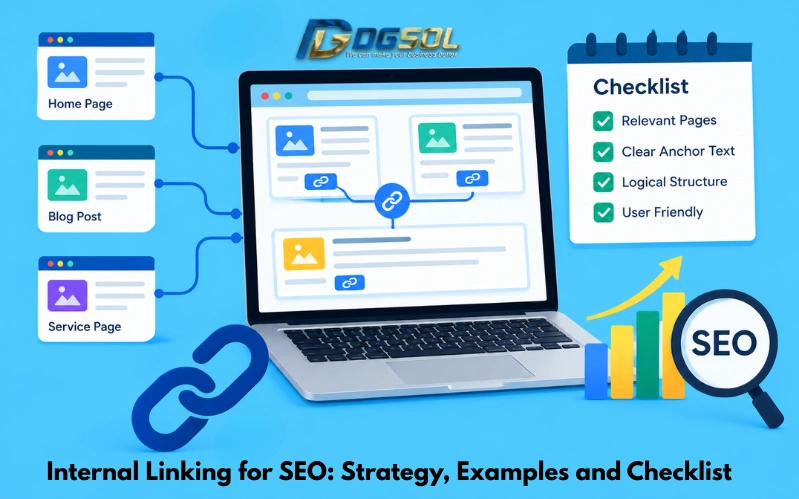
Internal linking for SEO is the process of connecting related pages on the same website through clickable links. A well-planned internal linking strategy helps visitors discover useful content, helps search engines find important pages, and creates a clearer structure across your website. However, effective internal linking involves more than adding links to blog posts. You need to connect related topics, use descriptive anchor text, prioritize important pages, and make sure links lead to relevant destinations.
For example, a website offering search engine optimization services might link its keyword research guide to related articles about on-page, technical SEO, and website optimization. These connections help readers explore related information and understand how different search engine activities work together. In this guide, you will learn how to do internal linking, build an effective internal linking strategy, find linking opportunities, audit internal links, and use a practical checklist to improve your website structure.
What Is Internal Linking in SEO?
Internal linking is the practice of linking one page on a website to another page on the same website. These links help users navigate content and provide search engines with pathways to discover pages and understand their relationships. For example, a blog post about keyword research could contain a contextual link to a guide explaining on-page SEO. Both pages belong to the same website, so the link is internal. Internal links are different from external links, which direct visitors to pages on other websites.
Types of Internal Links
Each type has a role. The best internal linking structure combines useful navigation with contextual links that support the reader’s journey. Different internal links serve different purposes.
- Contextual links: Links placed within the main content of a page. They help readers explore related information at the point where it is relevant.
- Navigation links: Links in menus and navigation bars that help users reach important sections of a website.
- Breadcrumb links: Links that show the position of a page within the website hierarchy, such as Home → SEO Services → Technical SEO.
- Related-content links: Links to relevant articles, products, resources, or services that readers may want to explore next.
- Footer links: Links placed in the website footer, often for important navigation or supporting information.
Why Is Internal Linking Important for SEO?
Internal links help connect your website’s content and make important pages easier to discover. When used thoughtfully, they can improve navigation and help search engines understand the relationships between pages.
-
Help Search Engines Discover Important Pages
Search engines use crawlable links to discover pages across a website. If a new article is linked from an existing, accessible page, the link creates another route through which a search engine can find it. Google recommends using crawlable HTML links and ensuring that important pages can be reached through links from other discoverable pages.
-
Help Search Engines Understand Page Relationships
Internal links provide context about how pages relate to one another. These connections help organize the website’s content around related topics. A logical structure also helps readers understand which pages provide general information and which offer more detailed guidance.
-
Direct Visitors to Relevant Content
Internal links give readers a clear path to additional information without requiring them to search the website again. Helpful navigation can enhance the user experience and encourage visitors to explore content that matches their needs.
-
Support Important Pages With Relevant Links
Links from relevant pages can help search engines understand which pages your website emphasizes. They can also help visitors discover key service pages, product pages, or comprehensive guides. This does not guarantee higher rankings. Internal links work alongside content relevance, technical accessibility, competition, and other SEO factors.
How to Create an Internal Linking Strategy for SEO
An effective internal linking strategy begins with your website’s purpose, important pages, and the relationships between your existing content.
Step 1: Identify Your Most Important Pages
Start by listing the pages that matter most to your website or business.
These may include:
- Main service or product pages.
- Important category pages.
- Comprehensive guides and pillar articles.
- High-performing blog posts.
- Pages that generate inquiries, purchases, or other valuable actions.
Prioritize pages according to their business value and role in your website, rather than selecting targets based only on keyword rankings.
Step 2: Organize Content Into Topic Clusters
Group related articles around a central topic or pillar page.
For example, a website covering SEO might have a central SEO guide supported by articles about:
- Keyword research.
- On-page SEO.
- Technical SEO.
- Schema markup.
- Internal linking.
- SEO performance measurement.
The central guide can link to the supporting articles, and those articles can link back to the main guide when doing so helps readers.
Step 3: Map Related Pages and Linking Opportunities
Create a simple list of existing pages and identify which pages would naturally help readers understand each topic better.
For example, an article about website speed may link to a related guide about Core Web Vitals. A keyword research guide may link to an article explaining how to map keywords to individual URLs.
Ask three questions before adding an internal link:
- Is the destination relevant to the sentence and the reader’s needs?
- Does it provide additional information that the current page does not fully explain?
- Will the link help the visitor take a useful next step?
If the answer is yes, the link is more likely to be useful.
Step 4: Connect Supporting Articles to Relevant Service Pages
Internal linking can also connect informational content with commercial pages.
For example, a guide explaining common technical SEO problems could link to a technical SEO service page where readers can learn about available solutions.
Keep the link contextual and useful. Not every blog post needs to link to every service page, and promotional links should not interrupt the flow of the content.
Step 5: Update Existing Content With Relevant Links
When publishing a new article, review older related articles to see whether they should link to it. For example, after publishing a guide about internal linking, you could review related articles about keyword research, on-page SEO, and technical SEO.
Add a link only where the new article provides useful information for the reader. Avoid inserting unrelated links simply to increase the number of internal links.
Internal Linking Best Practices for SEO
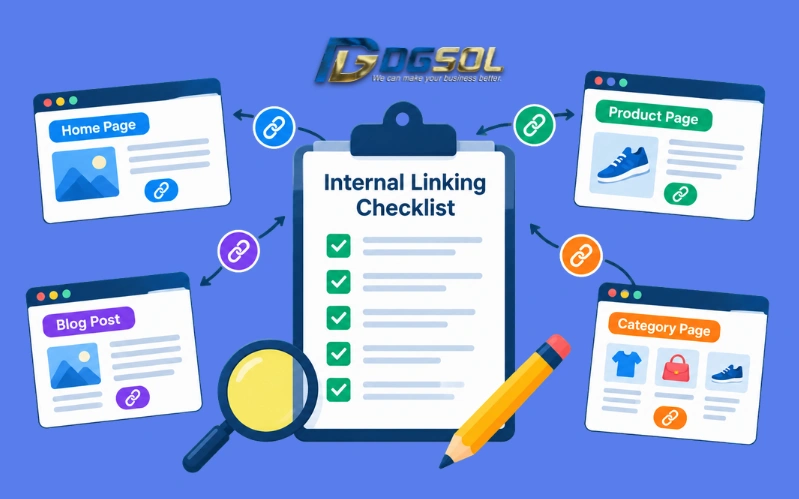
Following consistent internal linking best practices helps make your website easier to navigate and its content relationships clearer.
1. Use Descriptive and Natural Anchor Text
Anchor text is the clickable text used for a link. It should give readers a reasonable idea of what they will find on the destination page.
For example:
- Weak anchor text: Click here to learn more about website optimization.
- Better anchor text: Learn more about our guide to website optimization.
The second example provides clearer context about the destination.
Use relevant wording naturally. Avoid repeating the same exact-match keyword unnaturally across every link or stuffing several keywords into a single anchor.
Google’s anchor text guidelines recommend descriptive, concise, and relevant link text.
2. Place Contextual Links Where They Help Readers
Contextual internal links appear within the main content of a page. They are useful when a related resource can explain a concept in more detail.
For example:
“Before optimizing page content, learn how keyword research for SEO helps you identify the searches your target audience uses.”
The linked phrase should lead to a page that genuinely covers keyword research.
Keep the sentence readable even without considering its SEO value.
3. Link to Important Pages From Relevant Content
Review whether your important pages receive internal links from appropriate parts of your website.
A key service page may benefit from links from relevant blog articles, service navigation, and other useful pages. A central guide may benefit from links from supporting articles within the same topic cluster. Prioritize relevance and useful discovery rather than adding links everywhere.
4. Keep Important Pages Easy to Discover
Important pages should be reachable through clear navigation and appropriate internal links.
For a typical service website, the structure might be:
Homepage → Services → SEO Services → Technical SEO
Supporting blog posts can link to relevant service pages when the context justifies the connection.
For ecommerce websites, navigation may connect categories, subcategories, and individual product pages. Google’s ecommerce site structure guidance explains why crawlable navigation and links between pages matter.
5. Use Crawlable HTML Links
For standard website links, use HTML anchor elements with valid href attributes. Avoid relying solely on clickable text, buttons, or JavaScript events that do not expose a crawlable link.
A standard HTML link looks like this:
<a href=”/technical-seo/”>technical SEO guide</a>
The destination should be a valid URL, and the anchor text should accurately describe the target page.
6. Maintain Links When Your Website Changes
Website redesigns, URL changes, and deleted pages can leave internal links broken or pointing through unnecessary redirects.
When updating a website, review links to affected URLs and replace them with appropriate destinations. If a page has been removed, do not automatically redirect every link to the homepage. Choose a relevant replacement when one exists.
Internal Linking Examples: How to Link Pages Correctly
Practical internal linking examples help show how links can support navigation and connect related content.
Example 1: Blog Post to a Pillar Page
Suppose a website publishes a detailed guide about SEO and a separate article about keyword research. The keyword research article can link to the broader SEO guide where it helps readers understand how keyword research fits into the overall process.
Link direction: Supporting article → Main SEO guide.
Example 2: Blog Post to a Service Page
Imagine a digital marketing agency publishes an article explaining how to identify technical SEO problems. The article can link to a technical SEO service page when readers need professional assistance or want to learn about the available service.
Link direction: Informational article → Relevant service page.
Example 3: Linking Between Related Blog Articles
A website might have articles covering schema markup, structured data testing, and technical SEO. The article can link to the testing guide when explaining how to validate an implementation. The testing guide can link back to the broader schema markup guide for readers who need more background.
Link direction: Related article ↔ Related article.
Example 4: Linking From an Ecommerce Category to Product Pages
An ecommerce category page should provide clear links to the products listed within that category. For example, a wireless headphones category should link to the corresponding product pages so shoppers can compare and explore individual items.
Link direction: Category page → Relevant product pages.
Example 5: Linking Older Articles to New Content
Suppose you publish a new guide about keyword mapping. Review older articles about keyword research and on-page SEO. Where an existing paragraph discusses assigning keywords to URLs, add a contextual link to the new guide. This helps readers discover the more detailed resource.
Link direction: Relevant older content → New supporting guide.
Internal Link Structure: Build a Search-Friendly Website
Your internal link structure describes how pages connect across your website. A clear structure helps users navigate and gives search engines discoverable paths to important content.
1. Use a Logical Website Hierarchy
A service website might use this structure:
Homepage → Services → SEO Services → Technical SEO
A blog can support the service structure through relevant articles:
SEO guide → Technical SEO article → Technical SEO service page
An ecommerce website might use:
Homepage → Category → Subcategory → Product page
These are examples rather than rigid rules. The appropriate structure depends on the website’s size, content, and business model.
2. Create Topic Clusters Around Pillar Pages
Pillar pages provide a broad overview of an important topic. Supporting articles explain specific parts of that topic in more detail.
For example, a comprehensive guide might connect to articles about keyword research, internal linking, schema markup, and SEO performance measurement.
The supporting articles should link to one another when their subjects are genuinely related. This helps the cluster function as a useful collection of resources rather than an arbitrary group of pages.
3. Improve Links to Deep and Important Pages
Some pages become difficult to discover because they are buried several navigation levels deep or have few relevant incoming links.
Review important pages and identify where a clearer route would help users find them. On larger websites, a crawler can help reveal pages with few incoming internal links, but those pages should be evaluated by importance and purpose before changes are made.
4. Use Breadcrumbs Where Appropriate
Breadcrumbs show visitors where the current page sits within the site hierarchy.
For example:
Home → Digital Marketing → SEO → Technical SEO
They help users navigate to broader sections of the website. Their usefulness depends on how well they represent the actual page structure.
How to Audit Internal Links for SEO
An internal link audit helps identify broken links, orphan pages, unnecessary redirects, and opportunities to connect important content more effectively.
Step 1: Crawl Your Website
Use a website crawler to collect URLs and review the links discovered during the crawl.
Depending on your tool and configuration, the report may identify broken internal links, redirecting links, pages with few incoming links, and other site structure issues.
Make sure the crawl can access the parts of the website you want to examine.
Step 2: Find Broken Internal Links
Broken links point to destinations that no longer work, such as pages returning a 404 response.
Review the source page and determine the correct fix. You may need to update the link to a relevant existing page, restore a page that was removed by mistake, or remove the link if it no longer serves a purpose.
Step 3: Find Orphan Pages in SEO
An orphan page has no incoming internal links from other pages on the website.
These pages can be difficult for users and search engines to discover through normal website navigation.
A crawl alone may not find every orphan page because a crawler generally discovers URLs by following links. Compare the crawl with other URL sources, such as your XML sitemap, CMS page list, or analytics landing pages, to identify pages that exist but may not have incoming links.
Step 4: Identify Redirecting Internal Links
Internal links may point to URLs that redirect to another destination, often after a redesign or URL change.
Where appropriate, update those links to point directly to the final relevant URL. This can simplify navigation and reduce unnecessary redirect hops.
Before making changes, verify that the destination is correct and that the redirect is not required for another important reason.
Step 5: Check Links to Non-Indexable or Canonicalized Pages
Review important links that point to URLs blocked from crawling, marked noindex, redirected, or canonicalized to another page.
Not every non-indexable URL is a problem. Some links are intentional, and not every page needs to appear in search results.
Focus on inconsistencies that may prevent users or search engines from reaching important content in the intended way.
Step 6: Review Internal Link Distribution
Look for important pages that receive few relevant internal links and pages that link excessively to unrelated destinations.
A crawler can help identify pages with many or few incoming links, but the number alone does not determine importance. Evaluate the page’s business value, content quality, and place in the site structure before changing links.
Step 7: Fix Issues Based on Priority
A practical audit priority is:
- Repair broken links affecting important pages or user journeys.
- Connect valuable orphan pages to relevant content.
- Update links pointing through unnecessary redirects.
- Improve discovery of important pages with weak internal linking.
- Refine anchor text and remove distracting or irrelevant links.
Record the changes and review the affected pages after implementation.
How Many Internal Links Should a Page Have?
There is no universal number of internal links that every page should contain. The right number depends on the page’s purpose, content length, website structure, and the number of relevant pages that genuinely help readers. A detailed guide may naturally link to several supporting resources, while a short contact page may need very few contextual links.
1. How Many Internal Links Should a Blog Post Have?
A blog post should include links when they help readers explore related topics, understand a concept, or reach a useful next step.
For example, a keyword research article may link to a guide about on-page SEO and a relevant keyword mapping resource. It does not need to link to every article on the website.
Do not set an arbitrary quota for every post. Review whether each link has a clear purpose.
2. Can Too Many Internal Links Be a Problem?
Excessive, repetitive, or unrelated links can make content harder to read and distract visitors from the main topic.
Review link placement and relevance rather than trying to meet a specific number. Google’s link best practices emphasize clear, descriptive anchor text and useful context.
Internal Links vs. External Links: What Is the Difference?
Choose links based on whether they help readers and serve a genuine purpose. Internal links and external links serve different purposes.
| Factor | Internal links | External links |
| Destination | Another page on the same website | A page on another website |
| Main purpose | Connect your site’s content and pages | Direct readers to external information or resources |
| Navigation role | Help visitors explore your website | Help visitors access information hosted elsewhere |
| SEO role | Support page discovery and understanding of site relationships | Provide useful references and context when appropriate |
| Example | A keyword research article linking to an on-page SEO guide | An SEO article linking to official Google documentation |
Common Internal Linking Mistakes to Avoid
-
Using the Same Keyword-Rich Anchor Text Everywhere
Repeating an exact-match keyword unnaturally can make content sound forced. Use descriptive anchor text that accurately reflects each destination and fits the surrounding sentence.
-
Leaving Important Pages Without Internal Links
Important pages that are difficult to reach may be overlooked by users and harder to discover through normal crawling. Review your priority pages and make sure relevant content links to them.
-
Adding Irrelevant Links for SEO
A link should make sense in its context. Avoid linking unrelated topics just to increase the number of internal links or to force a keyword into a paragraph.
-
Ignoring Broken Links and Redirects
Website updates can leave outdated links in older articles. Audit important pages periodically and update links when destinations change.
-
Relying Only on Menus and Footers
Navigation links are useful, but they do not replace contextual links where additional information would help readers. Connect related content within the main text when appropriate.
-
Treating Internal Linking as a Guaranteed Ranking Shortcut
Internal links help discovery, navigation, and the understanding of page relationships. They do not guarantee rankings. Strong internal linking should support useful content and a well-structured website.
Conclusion: Build a Smarter Internal Linking Strategy
Internal linking for SEO is an important part of organizing website content, helping users discover relevant information, and providing search engines with crawlable routes between pages. Start by identifying your most important pages and connecting them with related articles, services, and resources. Use clear anchor text, build a logical site structure, and audit internal links to find broken links, orphan pages, and missed opportunities. As your website grows, review internal linking whenever you publish new content, update existing pages, or change URLs.
The goal is not to add as many internal links as possible. It is to create meaningful connections that help visitors find the right information and help search engines understand your website.
Frequently Asked Questions
How Does Internal Linking Help SEO?
Internal linking helps visitors navigate a website and gives search engines crawlable routes to discover pages. Descriptive links can also provide context about the destination and the relationship between related content.
How Do You Create an Internal Linking Strategy?
Identify important pages, group related topics, find relevant linking opportunities, use descriptive anchor text, and audit your website regularly. Link pages when the connection helps users or provides useful context.
What Is the Best Anchor Text for Internal Links?
The best anchor text is descriptive, reasonably concise, and relevant to the destination page. It should tell readers what to expect without forcing exact-match keywords into every link.
How Do You Find Orphan Pages?
Crawl your website and compare the discovered URLs with other sources, such as your sitemap, CMS, and analytics landing pages. Review pages that exist but have no incoming internal links, then decide whether to connect, update, or remove them based on their purpose.
How Many Internal Links Should a Page Have?
There is no fixed ideal number. Include links when they help readers understand the topic or navigate to relevant resources. The page’s purpose, length, and content relationships should guide the decision.
Are Internal Links More Important Than External Links?
They serve different purposes. Internal links connect your own pages and help users navigate your website, while external links direct visitors to other websites. Both should be used where they genuinely serve the reader.
Should Every Blog Post Link to a Service Page?
No. Link to a service page when it is relevant to the article and offers a useful next step. Unrelated promotional links can interrupt the reader’s experience.