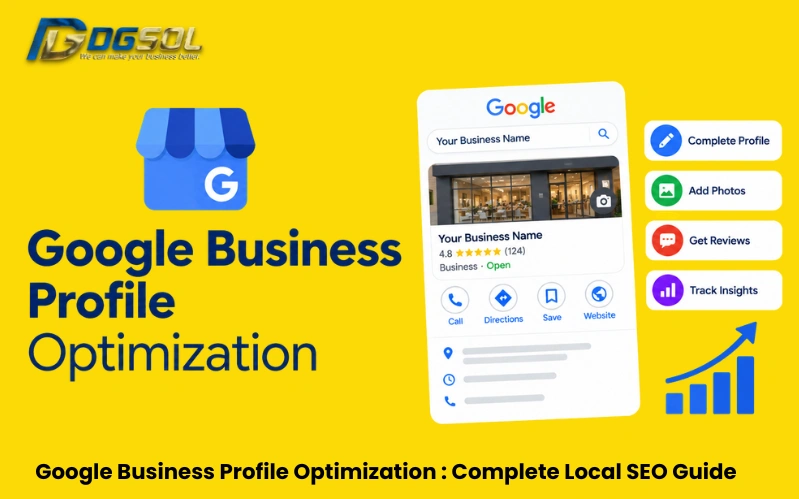
For local businesses in Malaysia, appearing in Google Maps or Google Search can make a major difference in how customers discover your business. A well-managed Google Business Profile (GBP) gives potential customers access to important information such as your business name, location, phone number, opening hours, services, photos, reviews, and website. However, creating a profile isn’t enough. Businesses need to keep their information accurate, choose relevant categories, manage reviews, add useful photos, and connect their profile with a properly optimized website. This guide explains Google Business Profile optimization step by step, including setup, verification, categories, services, Google Maps SEO, local citations, and common business problems.
What Is Google Business Profile?
Google Business Profile is a free business listing that allows eligible businesses to control how important business information appears across Google Search and Google Maps.
A profile can contain information such as:
- Business information
- Photos and videos
- Customer reviews
- Business attributes
- Relevant business links
- Questions and answers
Google uses information from business owners, public websites, users, third-party sources, and other data sources when displaying information about businesses.
You may still see the term Google My Business Malaysia in older SEO guides. Google My Business was the previous name for what is now called Google Business Profile.
Why Google Business Profile Matters for Local SEO
A Google Business Profile is an important part of local SEO Malaysia because it helps Google understand what a business does, where it operates, and what information customers need.
A complete profile can help potential customers:
- Find your business in Google Search
- Discover your business through Google Maps
- Call your business
- Visit your website
- Check opening hours
- Read customer reviews
- View photos
- Understand your services
- Get directions to your location
Google states that local results are mainly influenced by relevance, distance, and prominence. A complete and accurate Business Profile helps Google understand the business and match it with relevant local searches.
How to Set Up and Verify a Google Business Profile in Malaysia
Before optimizing, make sure the profile is properly created, claimed, and verified. Google states that businesses must add or claim their Business Profile and verify it to show their business information on Google Search and Maps.
1. Check Business Eligibility
Make sure your business meets Google’s eligibility requirements. Eligible businesses generally include businesses with a physical location customers can visit or businesses that travel to customers within a service area.
2. Create or Claim the Profile
Search for your business on Google. If a profile already exists, check whether you can claim it. If no profile exists, create one using the official Google Business Profile process.
3. Enter Accurate Business Information
Add your real-world business information, including:
- Business name
- Address or service area
- Phone number
- Website
- Business category
- Opening hours
4. Complete Verification
Google may require verification before the profile can fully appear or be managed. The available verification method can depend on the business and Google’s requirements.
5. Check for Duplicate Profiles
Avoid creating multiple profiles for the same business location unless Google’s guidelines specifically allow the setup. Duplicate or misleading profiles can confuse customers and may cause management or visibility problems.
Optimize Your Google Business Profile Business Information
Keep your core business information accurate and consistent. Here is what is given as:
- Business Name
Use your real-world business name. Do not add keywords, locations, promotions, phone numbers, or unnecessary descriptions to the business name just to influence rankings.
Google’s guidelines state that the business name should reflect the real-world name used consistently across the business’s branding and materials. Unnecessary information in the name is not permitted and can create profile problems.
For example, instead of: ABC Digital Marketing Agency Kuala Lumpur Best SEO Company
use the actual business name:
- ABC Digital
Then use the category, services, description, and website content to explain what the business offers.
- Address
Enter the accurate business address if customers visit your location. If the business does not serve customers at its address, use the appropriate service-area setup instead of displaying an address that does not represent the business.
- Phone Number
Use a real business phone number that customers can use to contact you.
- Opening Hours
Keep your regular opening hours accurate. Also update special hours for public holidays, temporary closures, or other changes.
Incorrect opening hours can create a poor customer experience.
- Website
Connect the profile to the relevant official website or appropriate local landing page. The website should reinforce the same business information shown on the profile.
Optimize Your Google Business Profile Description
The Google Business Profile description allows businesses to explain what they offer.
A useful description should naturally explain:
- What the business does
- Main products or services
- Who the business serves
- Where it operates
- Relevant experience or background
- What customers can expect
For example, a Malaysian digital marketing agency might describe its SEO, paid advertising, website development, and social media for business growth without repeatedly inserting city names.
Avoid writing a description that looks like a list of keywords.
Google’s guidelines say the description should provide useful information about products, services, mission, or history and should remain relevant and honest. Promotional pricing, irrelevant content, and links are not appropriate for the description field.
Example Structure
A simple description can follow this format:
Business type + main services + target customers + service location + useful differentiator
This creates a natural description without keyword stuffing.
Add and Optimize Services on GBP
The GBP services section can provide additional information about what your business offers.
For example, a digital marketing agency may list:
- SEO services
- Local SEO
- Technical SEO
- Google Ads management
- Social media marketing
- Website development
- Content marketing
A healthcare business may list its relevant treatments, while a home service company may list specific services it provides.
Optimize GBP Photos and Videos
Visual content can help customers understand what your business looks like and what you offer. Google allows businesses to add photos and videos showing their storefront, products, services, and other relevant aspects of the business.
Useful GBP photos can include:
- Exterior photos
- Interior photos
- Team photos
- Product photos
- Service photos
- Office or workplace photos
- Equipment
- Branded signage
- Completed projects
Photo Optimization Tips
Avoid uploading unrelated stock images simply because they contain a target keyword. Use:
- Clear images
- Authentic business photos
- Current photos
- Relevant images
- Good lighting
- Images that help customers recognize the business
Videos
The goal is to provide useful visual information rather than upload content solely for SEO. Where appropriate, short videos can show:
- Your business location
- Products
- Services
- Team
- Facilities
- Customer-facing processes
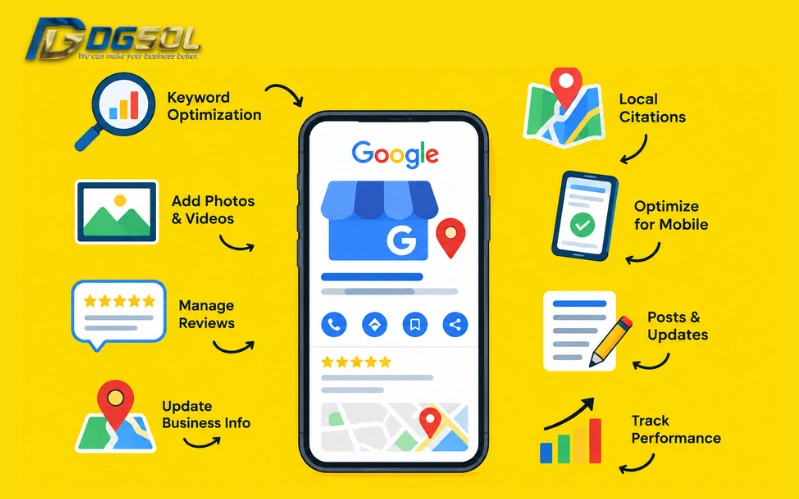
Get and Manage Google Business Profile Reviews
Reviews are an important part of the customer experience and can also contribute to local prominence. However, there is no guaranteed review count that automatically produces a particular ranking.
How to Get More Genuine Reviews
Businesses can make the process easier by:
- Asking genuine customers for feedback
- Providing the appropriate review link
- Requesting a completed purchase or service
- Asking customers to describe their experience
- Responding professionally to reviews
Do not create fake reviews or manipulate customers into posting misleading feedback.
How to Respond to Reviews
A good response should:
- Acknowledge the customer.
- Thank them for their feedback.
- Address the issue when appropriate.
- Keep the response professional.
- Avoid revealing private customer information.
For negative reviews, avoid arguing publicly. If the issue requires private details, invite the customer to contact the business directly.
Note: Verified businesses can respond to customer reviews through their Business Profile, and Google offers options to report reviews that violate its policies.
Google Maps SEO Malaysia: How to Improve Local Visibility
Google Maps SEO Malaysia focuses on helping Google understand a business’s relevance and location for local searches. No single trick guarantees a top Maps position.
Improve Google Maps Visibility With:
- Accurate Business Profile information
- Relevant business categories
- Complete services
- Genuine reviews
- Useful photos
- Accurate location or service area
- Consistent business information
- A relevant local website
- Appropriate local citations
- Clear local service information
Google identifies relevance, distance, and prominence as the main factors behind local results.
Google Maps Optimization Is Not Keyword Stuffing
Do not repeatedly add phrases such as:
SEO agency Kuala Lumpur, SEO agency Malaysia, best SEO agency Kuala Lumpur, SEO company KL
to every available field.
Instead, provide accurate business information and let relevant terms appear naturally in your profile and website.
How Google Local Pack Rankings Work
The Google Local Pack is the local business section that can appear in Google Search for queries with local intent. For example, a user searching for:
digital marketing agency Kuala Lumpur
may receive local business results alongside other search results. Google states that local ranking factors are mainly based on:
- Relevance
Your Business Profile closely matches the user’s search.
- Distance
How close the business is to the location relevant to the search.
- Prominence
How well-known or established the business is based on available signals.
NAP Consistency and Local Citations
NAP means:
Name + Address + Phone number
NAP consistency means keeping important business information accurate and consistent across relevant online sources.
Check your:
- Google Business Profile
- Website
- Local directories
- Industry directories
- Social profiles
- Business listings
- Other relevant citation websites
For example, avoid having:
- Website: ABC Digital Sdn. Bhd.
- Google Profile: ABC Digital Marketing
- Directory: ABC Digital Malaysia
when these names represent the same business but are presented inconsistently without a legitimate reason.
Local Keyword Research for GBP
Local keyword research helps you understand how potential customers search for your products and services. Start with the service or product, then consider location and search intent.
For example:
- SEO agency Kuala Lumpur
- SEO company Selangor
- Digital marketing agency Penang
- Web design company Johor Bahru
- Dentist Kuala Lumpur
Use Location Keywords Naturally
Location-based keywords can be useful on relevant website pages and local content. However, do not insert city names into every sentence or profile field.
For example:
Natural:
We provide SEO and digital marketing services to businesses across Kuala Lumpur and Selangor.
Over-optimized:
Best SEO agency Kuala Lumpur provides SEO Kuala Lumpur for SEO businesses Kuala Lumpur and SEO company Kuala Lumpur.
The first example communicates location naturally. The second looks like keyword stuffing.
Optimize Your Website Alongside GBP
Google Business Profile optimization works best when the profile and website provide consistent information.
Your website should clearly communicate:
- Business name
- Address or service area
- Phone number
- Services
- Locations served
- Contact information
- Business background
- Relevant customer information
Local Landing Pages
If you serve multiple locations, create location pages only when they provide genuinely useful information.
For example, an agency serving Kuala Lumpur, Penang, and Selangor may create useful location pages explaining:
- Services available
- Areas served
- Local customer needs
- Relevant case studies
- Contact information
- Local business information
GBP Posts and Updates
Google Business Profile posts can be used to share relevant updates with customers.
Examples include:
- New services
- Business announcements
- Events
- Product updates
- Completed projects
- Useful customer information
- Seasonal updates
The content should be accurate and relevant. Do not publish meaningless updates simply to create activity.
Google has content policies covering Business Profile posts, photos, and videos, so businesses should ensure published content follows the applicable guidelines.
Google Business Profile Q&A
The GBP Q&A area can help customers find answers to common questions.
Questions may relate to:
- Services
- Opening hours
- Parking
- Payment options
- Accessibility
- Booking
- Service areas
- Products
Monitor questions and provide accurate answers.
Q&A Best Practices
- Answer clearly
- Use factual information
- Keep answers concise
- Correct outdated information
- Avoid keyword stuffing
- Do not create misleading questions or answers
The goal is to make the profile more useful to potential customers.
Google Business Profile Management
GBP management is not a one-time task.
Business information can change over time, including:
- Opening hours
- Services
- Phone numbers
- Addresses
- Website URLs
- Photos
- Business categories
- Service areas
- Customer reviews
Regularly check the profile to make sure the information remains accurate.
Keeping the profile current helps customers receive accurate information when they search for the business.
Common Google Business Profile Mistakes
Google’s guidelines emphasize accurately representing the business and complying with Business Profile policies. Avoid these common problems when managing your profile.
- Keyword-Stuffing the Business Name
Use the real business name instead of adding target keywords.
- Choosing the Wrong Category
Select a category that accurately represents the business.
- Adding Unrelated Categories
Do not add categories simply to target additional searches.
- Using an Incorrect Address
The address or service area should accurately represent where the business operates.
- Ignoring Opening Hours
Outdated hours can cause customers to arrive when the business is closed.
- Using Poor or Irrelevant Photos
Photos should help customers understand the business.
- Ignoring Reviews
Monitor reviews and respond professionally.
- Inconsistent NAP Information
Keep important business details consistent across relevant platforms.
- Creating Thin Location Pages
Location pages should provide useful local information, not just repeat the same content.
- Writing Keyword-Stuffed Descriptions
Write for customers first and use relevant terms naturally.
- Creating Duplicate Profiles
Avoid unnecessary duplicate listings for the same business.
- Ignoring Profile Problems
Investigate verification issues, suspensions, ownership problems, and inaccurate information rather than ignoring them.
GBP Suspensions and Verification Problems
A Business Profile may have problems when its information or activity doesn’t comply with Google’s requirements.
Potential issues can include:
- Incorrect business information
- Eligibility problems
- Duplicate profiles
- Misleading business names
- Policy violations
- Verification problems
If your profile is suspended or disabled, review Google’s guidelines and follow the appropriate verification or reinstatement process.
Do not create a new profile simply to bypass a suspension.
Google notes that profiles violating its guidelines can become disabled or suspended and may stop showing to customers until the issue is resolved.
Final Thoughts
Effective Google Business Profile optimization is about providing Google and potential customers with accurate, complete, and useful business information.
For businesses in Malaysia, the process can be summarized as:
Set up → Verify → Complete → Optimize → Get genuine reviews → Maintain → Monitor
Focus on the fundamentals:
- Use accurate business information
- Select relevant categories
- Add genuine services and photos
- Keep opening hours updated
- Manage customer reviews
- Maintain NAP consistency
- Support GBP with local SEO
- Keep your website relevant to the locations you serve
- Follow Google’s Business Profile guidelines
Google’s local search system considers factors including relevance, distance, and prominence, so there is no legitimate shortcut that guarantees a particular Google Maps or Local Pack position.
Frequently Asked Questions
Is Google Business Profile the same as Google My Business?
Yes. Google My Business was the previous name for Google’s business listing product. The current name is Google Business Profile.
How do I create a Google Business Profile?
Create or claim the eligible business profile, enter accurate business information, and complete the verification process provided by Google.
How do I verify my Google Business Profile?
Google determines the available verification method for a business. Follow the verification instructions shown in your Business Profile and provide the requested information.
How does GBP affect Google Maps visibility?
A complete and accurate profile gives Google useful information for matching businesses with local searches. However, having a profile does not guarantee a specific Maps position.
How do I improve my Google Maps ranking?
Focus on accurate business information, relevant categories, genuine reviews, useful photos, relevant services, consistent local information, and a website that supports the same business and location information.
How important are Google reviews?
Reviews can contribute to a business’s prominence and provide useful information to customers. Google also recommends responding to reviews as part of managing the Business Profile.
Why is my business not ranking on Google Maps?
A lower Maps position can result from differences in relevance, distance, prominence, competition, or the search context. A verified profile does not guarantee a particular ranking.
What should I do if my Google Business Profile is suspended?
Review Google’s Business Profile guidelines, identify the information or activity that may have caused the issue, correct legitimate problems, and follow Google’s reinstatement or verification process.